


Free eBay Alerts: The Bot That Tells You First About Deals and Auctions
On eBay, Buy It Now bargains fly and auctions are won in the last minute. Here's how to hear about them in time, for free, on any country's eBay.
· 11 min read
Short answer
eBay lets you save searches and emails you about new listings, but in practice you get a daily digest. A BuyHub radar works like an eBay bot with nothing to install: it re-runs your search from our servers and alerts you as soon as something new appears, free every 30 minutes, every minute on Pro and Max. And if you bid, an alarm rings before the auction ends, even with your phone on silent.
On eBay, the good stuff goes in minutes
eBay is the world's biggest flea market, and that's exactly why so many people are watching. A well-priced item on Buy It Now lasts as long as it takes someone to spot it, and a good auction is decided in the last few seconds. Check once a day and you're late for almost everything.
And on eBay, getting there first costs you nothing: on BuyHub, alerts, auction alarms and eBay search are free.
Deals an alert puts right in front of you
Two examples of what slips away in minutes:
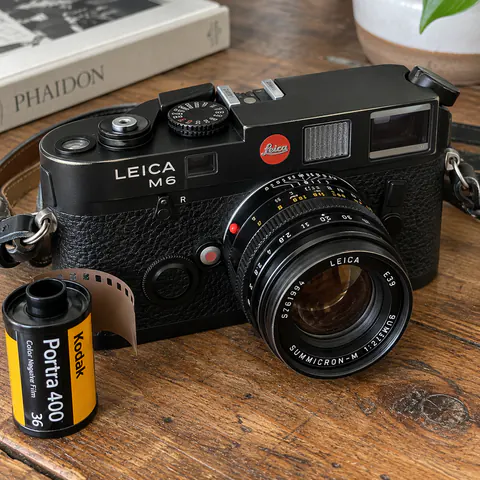
A camera the seller doesn't know the value of. A black Leica M6 with its lens, on Buy It Now for $1,000 (about £750) because it was “grandpa's old camera”. On the used market it goes for well above that. With an alert for the model and a top price, you hear about it before the hundreds of photographers hunting for one.
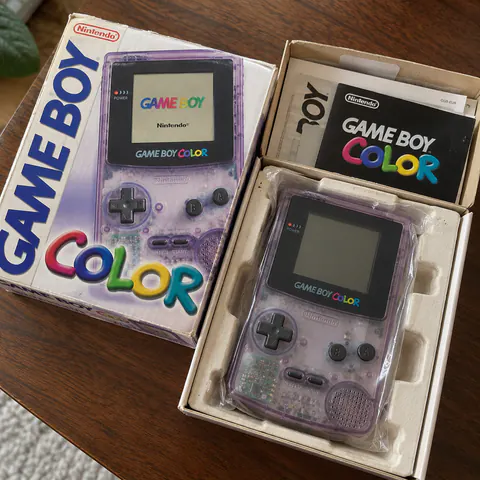
Boxed retro games. An Atomic Purple Game Boy Color with its box and cardboard tray, for $60 from someone clearing out a closet. Complete in box, it easily sells for much more, and on eBay it rarely lasts an afternoon.
eBay auctions: an alarm so you never miss the ending
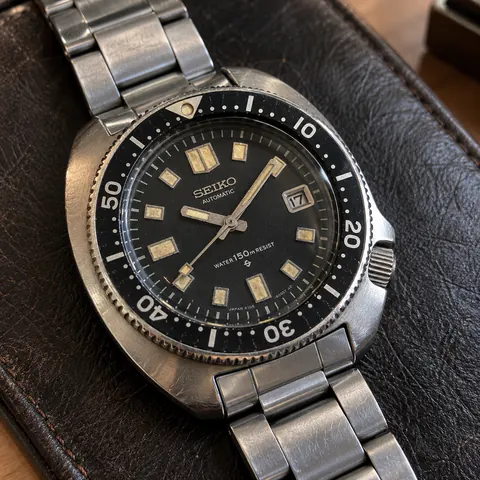
On eBay, many of the best pieces go to auction: a 1970s Seiko 6105 can start at $1 (or 99p on ebay.co.uk) and end wherever the people watching in the last minute take it. Look away and it ends without your bid, and the auctions that end in the small hours or in the middle of the workday are exactly the ones that go cheapest.
That's what BuyHub auction alarms are for. Paste the auction link, choose when you want to be alerted—say, 1 hour, 15 minutes and 1 minute before the end—and at that time your phone rings like an alarm clock, even on silent, with the photo, the current bid and a button to open the auction on eBay.
- Price limits. Have it alert you if the bid goes over a certain amount, or stay quiet once it's already past your budget.
- Quiet hours. At night, for example: during those hours you get a notification instead of an alarm.
- 25 alarms at once on the free plan. And when you save an auction to your favorites, we offer to set an alarm on it.
What BuyHub does for you on eBay
BuyHub uses eBay's own search, with its results and its filters, and adds what eBay doesn't have. All of this is on the free plan:
- A radar that searches for you. It checks your search every 30 minutes, day and night, and alerts you by web notification, in the app or by email. Every minute on Pro and Max.
- Search multiple terms at once. Up to 3 terms in the same radar: “leica m6”, “leica m4” and “leica m3”, each searched separately.
- Exclude words from your search without learning any syntax: “replica”, “for parts”, “box only”… What's filtered out stays out of your way, but it's kept with the reason in case you want a look.
- Every eBay filter, and then some. Condition, format, number of bids, free shipping, date listed (say, only the last 24 hours), item specifics like brand or size, programs like Authenticity Guarantee, Certified Refurbished or, on ebay.com.au, eBay Plus, and even listings from specific sellers.
- Seller location and “Ships to”. Pick the country or region you want sellers from and the country they have to ship to, so you only see what you can actually get.
- All 16 eBay sites in your language. Titles translated and prices in your currency, from ebay.com.au to ebay.de.
- Favorites that alert you. Save an item with the heart and you hear about it if the price drops, the listing changes or it sells.
- Saved searches with what's new highlighted. Go back to a saved search and see at a glance what's come up since last time.
How to search another country's eBay (and why it changes what you see)
Each eBay site shows what its sellers ship to that country. ebay.com shows you every item that ships directly to the US, wherever it comes from, and ebay.co.uk, ebay.ie, ebay.ca, ebay.com.au and ebay.com.sg do the same for theirs. But plenty of sellers only ship within their own country, and those listings never show up on your site. To see them, search the eBay site of the seller's country:
- Items from Japan: Japan has no eBay site of its own. Japanese sellers sell on ebay.com, so search ebay.com with the seller location set to Japan.
- Items from Australia: ebay.com.au. From the UK, ebay.co.uk; from Canada, ebay.ca; from Germany, ebay.de; from the US, ebay.com.
- To see even more: on that country's eBay, also set the seller location and “Ships to” to that country. You see far more results than when you ask for delivery to your own.
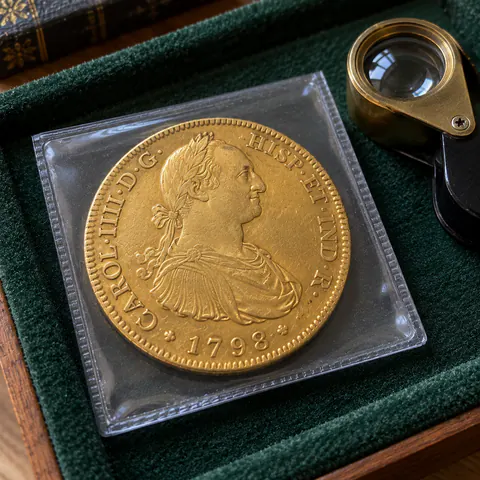
That's how you find pieces that almost never turn up on ebay.com or ebay.co.uk. Say, a 1798 gold 8 escudos coin from the reign of Charles IV of Spain, in an auction on ebay.de because someone in Munich inherited it. On BuyHub you see it with the title translated and the price in dollars, pounds or your own currency, and you can set a radar or an alarm on it like any other.
What if the seller doesn't ship to your country?
A listing with no shipping to your country doesn't mean you can't buy it:
- Ask the seller. Message them on eBay and ask whether they'd ship to you. Often the answer is yes: they just hadn't turned it on.
- Assisted purchasing. On BuyHub we offer assisted purchasing from our partners: they buy it for you in that country and ship it to your door.
- An address in that country. Or use an address you manage yourself, through our partners: you buy with delivery to that address and it gets forwarded to you.
It costs a bit more, because you pay a fee and a second delivery, but it opens up every eBay in the world.
eBay saved search notifications: they alert you, just not right away
eBay does let you save a search: you search, set your filters and select Save this search, at the top of the results page. From then on it emails you new listings that match, but not instantly: in practice you get a daily digest, and eBay's community forums are full of complaints about emails that arrive late or stop arriving. For a Buy It Now bargain, finding out the next day means not finding out at all.
On top of that, each saved search lives on your own country's eBay site, and your Watchlist only reminds you about auctions with one more phone notification among all the others.
eBay bot: the alternative with nothing to install
That's why so many people search for an “eBay bot”. What they usually find are Telegram or Discord bots, scripts you have to install, or services that ask for your eBay username and password. A BuyHub radar does the job of those bots without any of the downsides:
- Nothing to install. You create the radar on the BuyHub website or app and it runs from our servers, with your phone and computer switched off.
- An alert that's yours alone. Your search, your filters and your price: you're not up against a whole channel for the same listing.
- Your eBay account stays out of it. It never asks for your password or bids for you: it alerts you, and you buy or bid on eBay yourself, covered by the eBay Money Back Guarantee.
- Free for eBay. The radar, auction alarms and eBay favorites are on BuyHub's free plan.
eBay.com vs. eBay with BuyHub
| Feature | eBay.com | eBay with BuyHub |
|---|---|---|
| New listing alerts | eBay.com: By email, in practice a daily digest | eBay with BuyHub: Every 30 minutes free; every minute on Pro and Max |
| When it searches | eBay.com: Whenever eBay decides | eBay with BuyHub: All the time, from our servers, even with nothing open |
| How you're alerted | eBay.com: Email and eBay app notifications | eBay with BuyHub: Set it up your way: web notifications, in the app and by email |
| Auction endings | eBay.com: A reminder among all your phone notifications | eBay with BuyHub: An alarm that rings when you choose, even on silent, with price limits |
| Scheduled bids | eBay.com: No | eBay with BuyHub: Coming soon |
| Search multiple terms at once | eBay.com: With advanced search syntax | eBay with BuyHub: Yes: several words or phrases in the same alert |
| Exclude words from your search | eBay.com: With advanced search operators | eBay with BuyHub: Yes, no syntax needed, and what's filtered out is kept with the reason |
| eBay sites | eBay.com: Your own country's; the rest separately, each in its own language | eBay with BuyHub: All 16 eBay sites, with titles translated and prices in your currency |
| If they don't ship to you | eBay.com: You're on your own | eBay with BuyHub: Assisted purchasing and addresses from our partners |
| Other marketplaces | eBay.com: eBay only | eBay with BuyHub: Also Catawiki and Amazon for free, plus Vinted, Mercari, Facebook Marketplace, Gumtree and 100+ more sites |
| Price | eBay.com: Free | eBay with BuyHub: Free for eBay: 1 radar, 25 alarms and 50 favorites |
How to set up your eBay alert on BuyHub
- Create your free account and go to Radar. Tap Create radar.
- Choose the eBay site you want to watch: ebay.com, ebay.co.uk, ebay.ca, ebay.com.au… Each radar watches one site.
- Type what you're after the way the seller would write it: model, brand, reference number. You can enter up to 3 words or phrases, and each one is searched separately.
- Set a top price and the eBay filters: category, condition, format (auction or Buy It Now), seller location and “Ships to”. Under Advanced, add the words that rule a listing out, like “replica” or “for parts”.
- Tap Test radar to see what it would find right now, then create it. From that moment on, it alerts you to whatever gets listed.
- For a specific auction, paste its link in Alarms and choose when you want it to ring.
If it's your first radar, there's a step-by-step walkthrough with screenshots in Creating a radar, and everything about alarms in Setting an alarm on an auction.
Tips for hunting on eBay
- Check sold items before you bid. eBay lets you filter by Sold items: you see what something actually sold for and know how high to go.
- Search for misspellings. The best bargains come from people who can't spell the name: set up an alert for “leika” or “gameboy colour” too.
- Set alarms on auctions that end at odd hours. In the small hours or during the workday fewer people are bidding, and that's when things go cheapest.
- Make an offer. Plenty of Buy It Now listings accept a Best Offer: get there first and the seller hasn't seen any others yet.
- Filter for what's just been listed. With the date listed set to the last 24 hours, you only see what's new, without wading through what you've already seen.
Frequently asked questions
Does eBay notify you when a new item is listed?
Yes, if you save the search: eBay emails you new listings that match, but not right away, and in practice you get a daily digest. To hear about them within minutes, you need a separate alert, such as a BuyHub radar.
Are eBay alerts on BuyHub free?
Yes. BuyHub's free plan includes eBay, Catawiki and Amazon: 1 radar with up to 3 terms that searches as often as every 30 minutes, 25 auction alarms, 50 saved searches and 50 favorites.
How often does a BuyHub radar search eBay?
You choose. On the free plan, as often as every 30 minutes; on Starter, every 5 minutes; and on Pro and Max, every minute.
How do I get the alerts?
However you like: web notifications, notifications in the BuyHub app for iPhone and Android, or email. New listings are also waiting for you, highlighted, on the radar screen.
Can I set an alarm on an eBay auction?
Yes. Paste the auction link in Alarms and choose when you want it to ring, for example 1 hour, 15 minutes and 1 minute before the end. Your phone rings like an alarm clock, even on silent, and you can set price limits and quiet hours.
Can I schedule my eBay bids with BuyHub?
Coming soon. You'll be able to set your maximum bid and BuyHub will place it for you in the final seconds of the auction. Until then, alarms alert you in time to bid yourself.
How do I search eBay for items from Japan?
Japan has no eBay site of its own: Japanese sellers sell on ebay.com. Search ebay.com with the seller location set to Japan. For Australia, use ebay.com.au; for the UK, ebay.co.uk; for Canada, ebay.ca; and for Germany, ebay.de.
What if the seller doesn't ship to my country?
Ask them on eBay whether they'd ship to you: they often do. If not, BuyHub offers assisted purchasing from our partners, who buy it for you, or an address in that country: you have it delivered there and it gets forwarded to you.
Do I need an eBay account?
Not to get alerts: your BuyHub account is enough. To buy or bid, yes, because you do that on eBay yourself, as usual.
Is it the same as an eBay bot?
It does the job of those alert bots, but without installing or configuring anything, from our servers, and with an alert that's yours alone: your search, your filters and your price.
Can using an eBay bot get my account suspended?
A BuyHub radar doesn't use your eBay account: it never asks for your password, never signs in and never bids for you. It only tells you what's been listed and when an auction ends; you buy or bid on eBay yourself.
Sources
What this guide says about eBay was checked against these pages on October 12, 2026. Stores change their features: if something here is out of date, tell us at contact@buyhub.app.